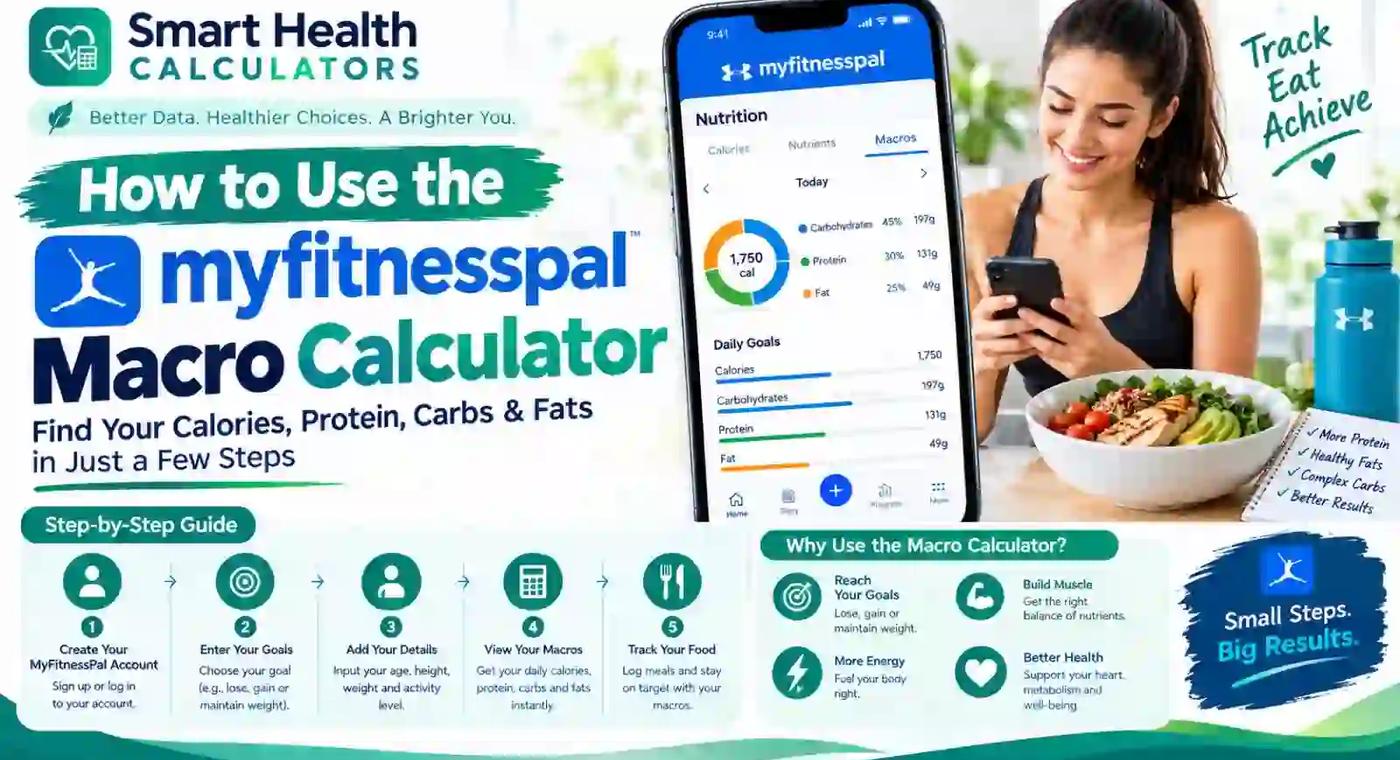
MyFitnessPal Macro Calculator: How to Set Macros
Learn how to use the MyFitnessPal Macro Calculator, set custom macros, understand calorie targets, and choose the right protein, carb, and fat split.
MyFitnessPal's macro calculator starts everyone at the same default split — 20% protein, 50% carbs, 30% fat — based on your profile, then lets you customize it from there. That default isn't a universal nutrition standard; it's simply MyFitnessPal's starting point, and most people end up adjusting it once they understand what the numbers actually mean for their specific goal.
This guide walks through exactly how the calculator works, how to change your macros step by step, and the real differences between the free and Premium versions — including a few details that trip people up if nobody explains them clearly.
How Does MyFitnessPal Calculate Your Macros?
MyFitnessPal estimates your calorie needs using the Mifflin-St. Jeor equation, a widely used formula that factors in your age, weight, height, sex, and activity level to calculate your Total Daily Energy Expenditure (TDEE). Once your calorie target is set — adjusted up or down depending on whether your goal is weight loss, maintenance, or gain — the app then splits those calories into protein, carbs, and fat according to the default 20/50/30 ratio, unless you customize it.
Protein needs specifically get calculated with body weight and activity level in mind, referencing sports nutrition guidelines from organizations like the International Society of Sports Nutrition, rather than being a completely arbitrary percentage.
How to Set Custom Macros in MyFitnessPal: Step-by-Step
- Open the MyFitnessPal app and tap More
- Go to Goals
- Select Calories, Carbs, Protein & Fat Goals (sometimes labeled "Calorie & Macro Goals" depending on your app version)
- Use the macro wheel or sliders to adjust each percentage
- Confirm your three macros total exactly 100% — if they don't, the app highlights the error in red and won't let you save until it's corrected
- Tap the checkmark to save your new goals
This same navigation path works on both the mobile app and desktop, though the exact menu wording can shift slightly with app updates — if a label looks different, look for "Nutrition Goals" or "Macro Goals" nearby, since the underlying feature hasn't moved.
Free vs. Premium: What Actually Changes
This is where a lot of confusion comes from, since generic articles often blur the details. Here's the real breakdown:
| Feature | Free | Premium |
|---|---|---|
| Macro adjustment increments | 5% only | 1% precision |
| Gram-based macro targets | Not available | Available |
| Different macros by day of week | Not available | Available |
| Dashboard macro visibility | Limited | Full visibility |
| Barcode/image food scanning | Limited | Full access |
The 5% increment limitation on the free version means you can set protein at 25% or 30%, but not 27% — a detail that surprises people trying to dial in a very specific split. If you need gram-level precision (say, exactly 150g of protein rather than "roughly 25% of calories"), that specifically requires Premium.
What Is the Macro Balance Card?
The macro balance card is the dashboard element showing how your actual logged intake compares against your set targets throughout the day, broken down by protein, carbs, and fat. Free users get a more limited view of this compared to Premium, where full macro breakdowns remain visible without needing extra taps to access them.
Why Do My Macros Keep Changing?
If your macro targets seem to shift without you touching the settings, the most common cause is logged exercise. When you log a workout, MyFitnessPal often adds calories back into your daily goal to account for the activity, and those additional calories get redistributed according to your existing macro percentages — which can make your gram targets look different day to day even though your percentage split hasn't changed.
Weight changes also affect this. Since protein needs are calculated partly from body weight, losing or gaining a meaningful amount of weight will shift your calculated macro targets the next time the app recalculates, which is expected rather than a glitch.
How to Set a Keto, High-Protein, or Custom Macro Split
MyFitnessPal doesn't require Premium to attempt specialty splits — you can manually adjust the free version's percentages to approximate common approaches:
- Keto-style: roughly 5-10% carbs, 20-25% protein, 70-75% fat
- High-protein for fat loss: roughly 35-40% protein, 30-35% carbs, 25-30% fat
- Muscle-building focus: roughly 25-30% protein, 45-50% carbs, 20-25% fat
These are common starting ranges rather than fixed rules — the right split depends on your specific goal, activity level, and how your body responds over a few weeks of consistent tracking. If you want help figuring out your calorie baseline before setting macro percentages on top of it, our calorie intake planner is a useful first step, and our detailed guide on how much protein you actually need per day explains the reasoning behind protein-first macro planning in more depth.
How Do I Know If My Macro Split Is Right for My Goal?
Rather than fixating on a "perfect" percentage, track how you feel and perform over 2-3 weeks at a given split, then adjust based on real results — hunger levels, energy during workouts, and whether your weight is trending in the direction you want. Getting within 5-10 grams of your target most days is accurate enough for meaningful progress; obsessive precision on any single day matters far less than consistency across weeks.
How Often Should I Recalculate My Macros?
A reasonable rule of thumb is recalculating your goals after roughly every 10 pounds of weight change, since your calorie and protein needs shift as your body weight changes. Waiting months without reassessing means you could be training and eating based on numbers that no longer reflect your actual body weight or metabolic needs.
Is MyFitnessPal's Macro Calculator Accurate?
It provides a solid, science-based starting estimate using an established formula (Mifflin-St. Jeor) and reasonable protein guidelines, but like any calculator, it can't account for individual metabolic variation with perfect precision. Treat the initial numbers as a well-reasoned starting point rather than an exact prescription, and adjust based on how your actual results track over the following weeks — this is true of every macro calculator, not a specific weakness of MyFitnessPal's.
Frequently Asked Questions
How do I use the MyFitnessPal macro calculator?
Set up your profile with age, weight, height, activity level, and goal, and the app automatically calculates a calorie target split into the default 20% protein, 50% carbs, 30% fat ratio, which you can then customize under More → Goals → Calories, Carbs, Protein & Fat Goals.
What is the default macro split in MyFitnessPal?
20% protein, 50% carbohydrates, and 30% fat, according to MyFitnessPal's own Help Center documentation.
Can I set custom macros in MyFitnessPal for free?
Yes, free users can adjust macro percentages, but only in 5% increments, and all three must total exactly 100%.
What's the difference between free and Premium macro features?
Premium unlocks 1% adjustment precision, gram-based macro targets instead of percentages only, the ability to set different macros for different days of the week, and fuller dashboard visibility.
Why do my macros keep changing in MyFitnessPal?
This usually happens when you log exercise, since the app often adds calories back into your daily goal and redistributes them according to your existing macro percentages, or when your weight changes enough to trigger a recalculation.
How do I set a keto macro split in MyFitnessPal?
Manually adjust your percentages to roughly 5-10% carbs, 20-25% protein, and 70-75% fat using the macro wheel under your goal settings — no Premium subscription required to attempt this.
How accurate is MyFitnessPal's macro calculator?
It uses an established formula (Mifflin-St. Jeor) and reasonable protein guidelines for a solid starting estimate, though like any calculator it should be treated as a starting point to refine based on your actual results over time.
How often should I recalculate my macros?
A reasonable guideline is reassessing after roughly every 10 pounds of weight change, since calorie and protein needs shift as body weight changes.
Final Takeaway
MyFitnessPal's macro calculator gives you a scientifically reasonable starting point, but the real value comes from understanding what the numbers mean well enough to adjust them as your body and goals change. Start with the default split if you're new to macro tracking, move to a custom percentage split once you have a specific goal in mind, and don't hesitate to recalculate every time your weight shifts meaningfully rather than tracking against outdated numbers.
If you want to double-check your calorie baseline or protein target independently before adjusting your MyFitnessPal settings, our calorie intake planner and BMR calculator are useful cross-references, and our broader guide on why your diet might not be working is worth a read if your macros feel right on paper but your results aren't matching up.
Steps verified against MyFitnessPal's official Help Center article as of 2026. For the most current guidance, see MyFitnessPal's Macro Calculator support page directly, since app features and navigation can be updated periodically.
Medical Disclaimer
This article is for general education only. It is not medical advice, diagnosis, treatment, prescription guidance, or a replacement for professional healthcare. Speak with a qualified healthcare professional for personal medical concerns, symptoms, pregnancy concerns, mental health crisis, medication questions, or before making major health changes.